> ## Documentation Index
> Fetch the complete documentation index at: https://docs.joinyellowbrick.com/llms.txt
> Use this file to discover all available pages before exploring further.
# Follow authors
> Check an author's record, understand Elite and Rising tags, and follow people whose work you want to keep seeing.
Following is how Yellowbrick stays useful after the first session. You pick people whose work you trust. Their new pitches show up under **From authors you follow** and can trigger notifications.
Following is free. If an author sells premium research, that is a separate [subscription](/guides/subscribe-to-authors).
## Elite and Rising
Yellowbrick tags some authors **Elite** or **Rising**. You see the badge next to their name on pitch cards, author pages, and under **Authors to follow** on Home.
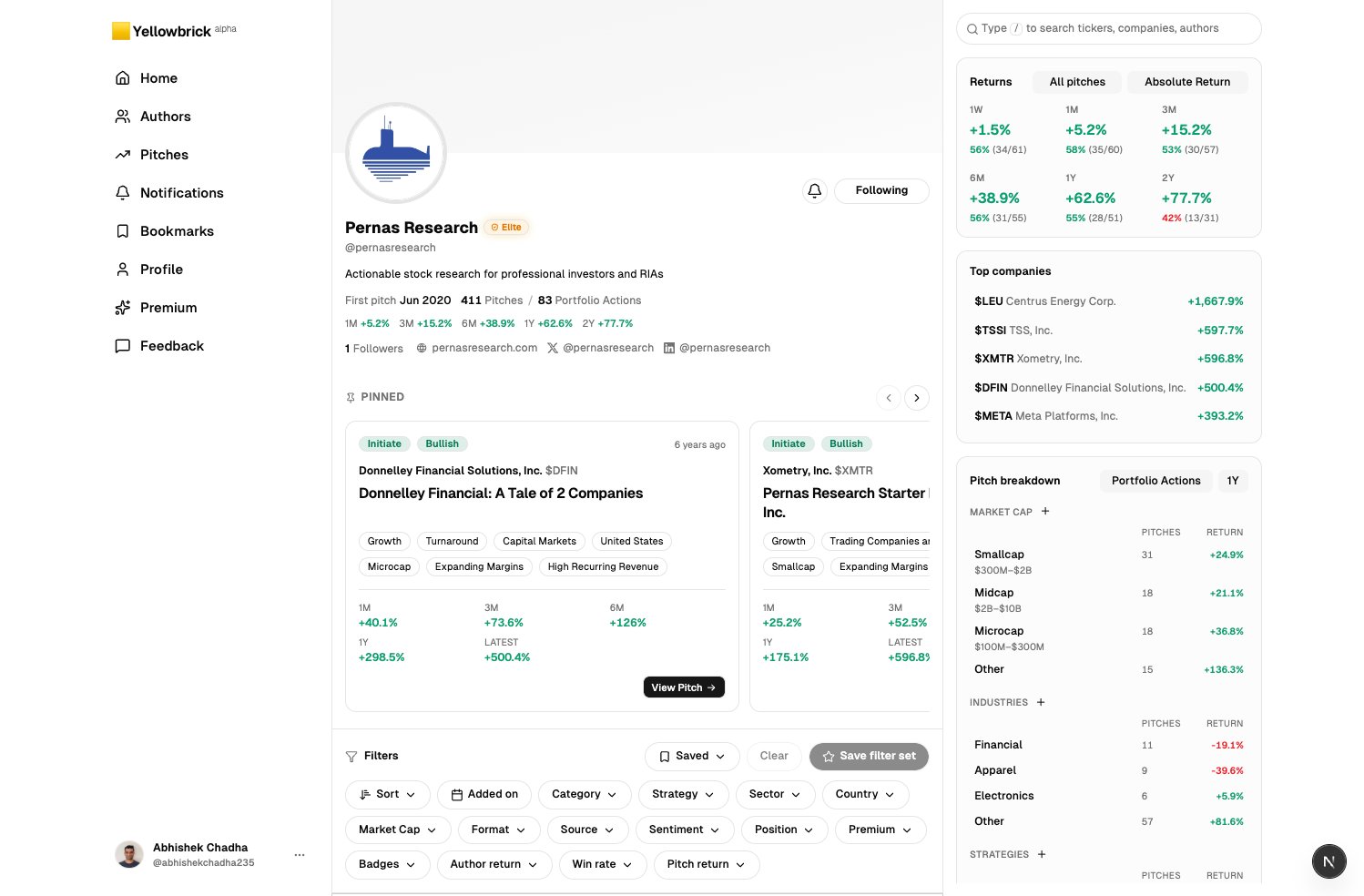
**Elite** is for authors with a proven record. We look at realized returns and consistency, not follower count. The badge is a shield. **Elite Only** on Home (a Premium filter) shows only these authors.
**Rising** is for authors we think are worth watching as they build that record. The badge is a small trend icon. Rising authors do not appear when **Elite Only** is on.
Most authors have no Elite or Rising badge. We only apply those tags when the record is clear.
Authors cannot assign these tags themselves. If you write research and want to ask about a tag, see [For authors](/authors).
## Find an author
You can get to a profile from:
* A pitch card (click the author name).
* **Authors to follow** on the Home right rail, split into Elite and Rising.
* Search (`/`) by handle or name.
* The **Authors** page in the sidebar.
 ## Decide whether to follow
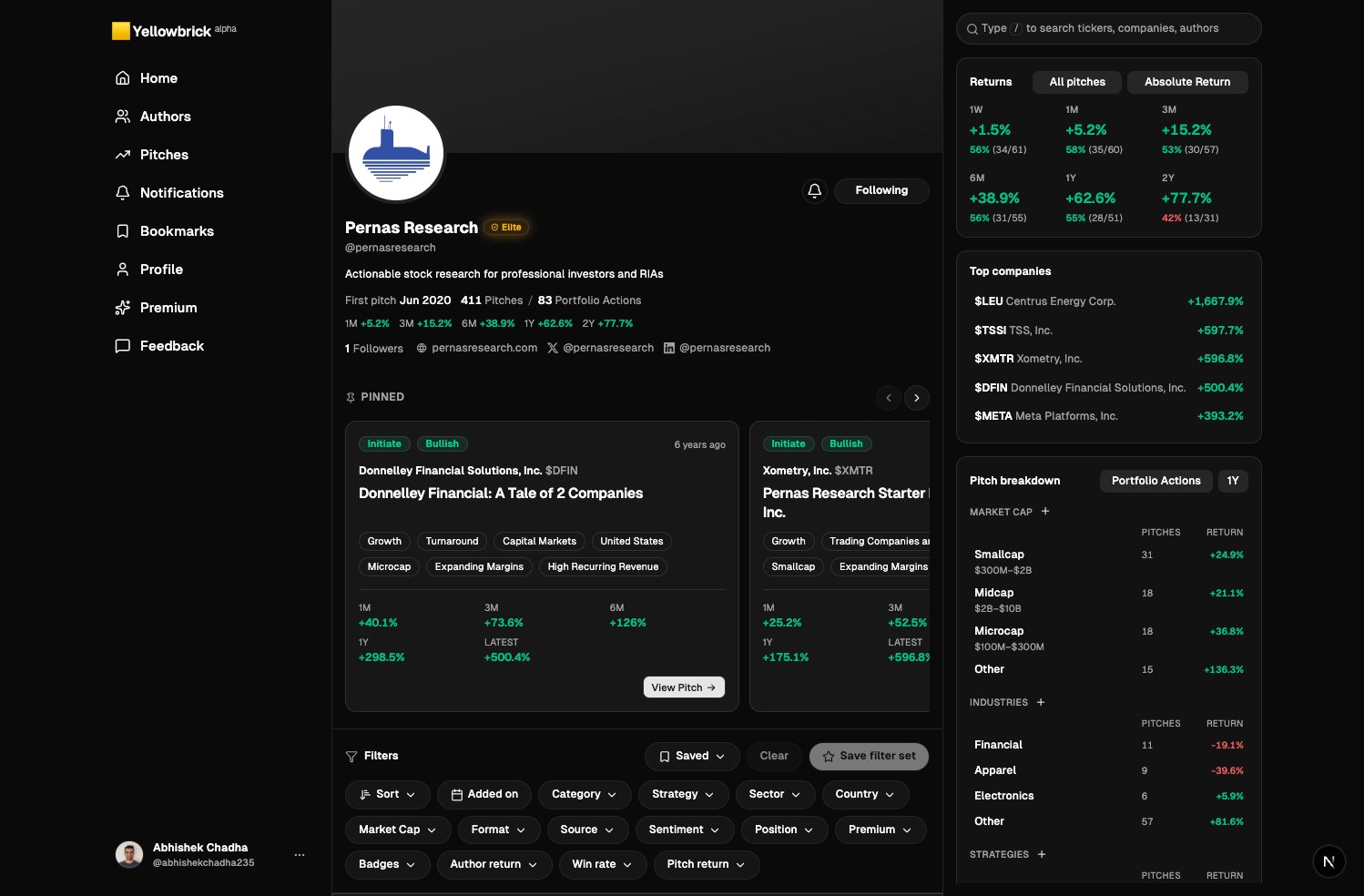
Pitch count, first pitch date, and returns by window (1M, 3M, 6M, 1Y). The right rail repeats returns with hit rate.
**Top companies** shows names that paid off. **Pitch breakdown** splits history by market cap, industry, and strategy so you can see if their edge matches how you invest.
Same chips as Home. Use them to see only earnings reviews, a sector, or bullish names before you commit.
The button is next to the handle. After that, new pitches from this author appear on Home under **From authors you follow**.
You can also Follow from the Home right rail without opening the profile. Open the profile first if you have not seen their record.
## Stay current
Open **Notifications** in the sidebar for new pitches from people you follow.
On Home, switch to **From authors you follow** when you want only that list, still with the same filters and **Elite Only**.
Unfollow from the same button on the author page if the stream is no longer useful.
## Decide whether to follow
Pitch count, first pitch date, and returns by window (1M, 3M, 6M, 1Y). The right rail repeats returns with hit rate.
**Top companies** shows names that paid off. **Pitch breakdown** splits history by market cap, industry, and strategy so you can see if their edge matches how you invest.
Same chips as Home. Use them to see only earnings reviews, a sector, or bullish names before you commit.
The button is next to the handle. After that, new pitches from this author appear on Home under **From authors you follow**.
You can also Follow from the Home right rail without opening the profile. Open the profile first if you have not seen their record.
## Stay current
Open **Notifications** in the sidebar for new pitches from people you follow.
On Home, switch to **From authors you follow** when you want only that list, still with the same filters and **Elite Only**.
Unfollow from the same button on the author page if the stream is no longer useful.